

Table of Contents
- Why Pause Instead of Cancel Your Coffee Subscription
- How to Pause Your Coffee Subscription on Desktop
- Pausing Your Subscription on Mobile
- How to Skip a Single Coffee Shipment
- Coffee Subscription Pause Duration and Limits
- Understanding Your Coffee Subscription Cancellation Policy
- Resuming Your Paused Subscription
- Managing Notifications and Account Settings While Paused
Last Updated: August 25, 2026
Why Pause Instead of Cancel Your Coffee Subscription
Pausing a coffee subscription is fundamentally different from canceling it. When you pause, your account remains active, your preferences are preserved, and you can resume whenever you're ready. When you cancel, you're starting from scratch if you change your mind later.
Life happens: travel, busy seasons, or accumulated inventory can shift your coffee needs. A pause acknowledges this reality without forcing a permanent decision. At Cuppari Coffee, we designed the pause feature because coffee lovers don't have consistent needs year-round. You might order weekly during winter, then skip deliveries in summer when iced tea becomes your go-to.
Pausing also protects your loyalty status and accumulated rewards. When you cancel and rejoin, you're treated as a new customer and lose your standing (bbb.org). A pause keeps you exactly where you left off. Most services allow indefinite pauses or pauses up to several months, making pausing the smarter choice for temporary changes rather than permanent cancellation.
How to Pause Your Coffee Subscription on Desktop
Pausing your coffee subscription on desktop takes under two minutes once you're logged in. The subscription dashboard puts all controls in one accessible location.
Logging into Your Subscription Dashboard
Navigate to the Cuppari Coffee website and click the account login link in the top right corner. Enter your email and password. If you've forgotten your credentials, use the "Forgot Password" link to reset via email.
Once logged in, look for "My Account," "Subscription," or "Dashboard" in the navigation menu. Click it to access your subscription management page. You'll immediately see your subscription status, next delivery date, billing cycle details, payment method, shipping address, and order history, everything in one place.
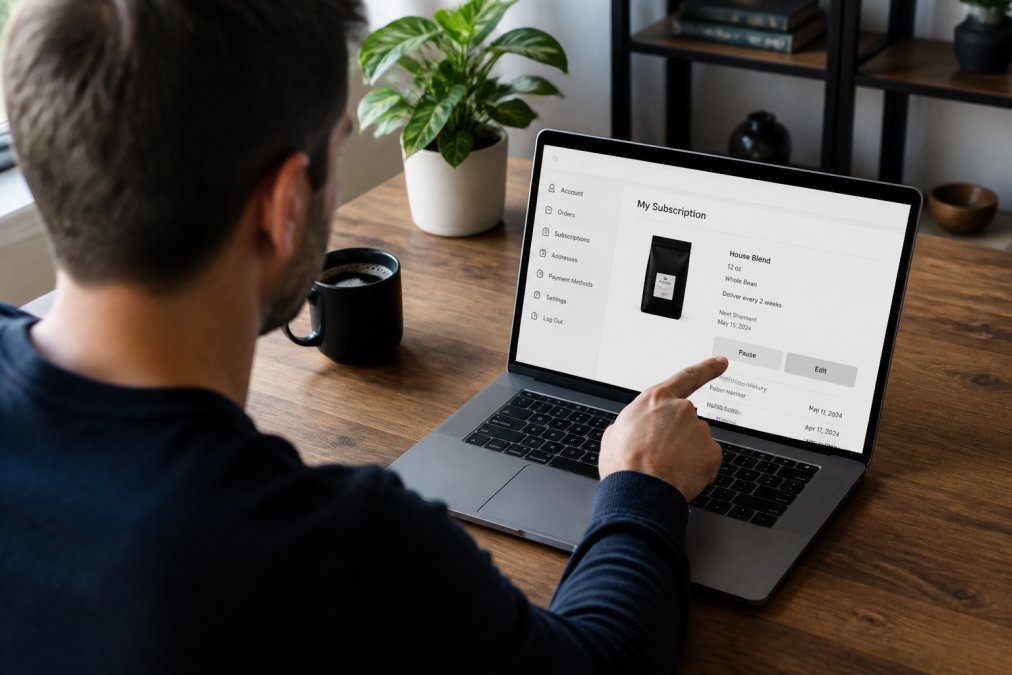
Finding and Using the Pause Button
Locate the pause button on your subscription dashboard, typically displayed prominently near your subscription status or in an "Actions" section. Click it to access pause options.
You'll see a confirmation screen asking how long you want to pause. Review the details and click "Confirm Pause." You'll see an immediate confirmation message and receive a confirmation email.
Your subscription status will update to "Paused." Your next scheduled delivery will be canceled, and no charges will appear on your billing cycle until you resume. Your account remains fully active, so you can still log in, view order history, update your payment method, or change your shipping address anytime.
Pausing Your Subscription on Mobile
The mobile experience differs slightly due to screen size, but the process is equally straightforward. Open the Cuppari Coffee app or visit the mobile website and log in with your credentials.

Tap the hamburger menu (three horizontal lines) in the top corner and select "My Subscription" or "Manage Subscription." Find the pause button and tap it. Select your pause duration and confirm. You'll receive a confirmation notification and email, and your status will immediately update to "Paused."
The advantage of mobile pausing is convenience: you can pause your subscription from anywhere without waiting to reach a computer. The functionality is identical to desktop, just adapted for a smaller screen.
How to Skip a Single Coffee Shipment
Skipping a single shipment differs from pausing your entire subscription. When you skip, your subscription remains active and resumes on your next scheduled delivery date. This is useful when you have enough coffee on hand for one cycle but want to continue receiving deliveries afterward.
Log into your subscription dashboard and locate your upcoming delivery. Click the "Skip" or "Skip This Shipment" button next to it. Confirm if prompted. Your subscription will automatically move to the following delivery cycle.
You can skip multiple shipments in advance if you know you'll be away or overstocked. The key difference: skipping is temporary and automatic, while pausing requires you to manually resume. If you skip, your subscription automatically continues. If you pause, you must actively resume when ready.
Coffee Subscription Pause Duration and Limits
Most coffee subscription services allow pauses ranging from one month to indefinite, though specific limits depend on the service's policies (the FTC). Some services don't impose a maximum pause duration at all.
An indefinite pause means your subscription stays paused until you decide to resume. There's usually no charge associated with pausing, your billing cycle stops entirely, and your renewal date freezes until you resume.
However, some services have restrictions. A few limit how many times you can pause yearly or require a minimum active period before pausing is available. Check your subscription's terms of service to understand any specific limitations. If you're on promotional pricing, pausing might affect that rate upon resumption. Contact customer support if unsure how pausing affects your pricing.
Understanding Your Coffee Subscription Cancellation Policy
Your subscription's cancellation policy defines what happens when you pause, skip, or cancel entirely. Most policies clearly distinguish between pausing (temporary), skipping (single shipment), and canceling (permanent).
Canceling ends the service permanently. Some services allow reactivation within 30 to 90 days, but after that, you're treated as a new customer. Pausing is explicitly temporary, your account remains active, preferences are saved, and you can resume whenever you choose.
Some services charge a cancellation fee if you cancel within a certain period of signing up (the FTC). Pausing typically has no fee. Your cancellation policy should also explain what happens to loyalty points or rewards. When you pause, these usually stay in your account. When you cancel, they might be forfeited. Check this detail before deciding, especially if you've accumulated meaningful rewards.
Resuming Your Paused Subscription
Resuming a paused subscription is as simple as pausing it. Log into your dashboard, find your subscription status (showing "Paused"), and click "Resume" or "Reactivate Subscription."
Your subscription goes back into its regular schedule immediately. Your payment method, shipping address, coffee preferences, and all account details remain exactly as you left them. You'll receive a confirmation email, and your dashboard will update to show "Active" status with your next delivery date clearly displayed.
If you've been paused for a very long time, double-check that your payment method is still active and valid before resuming to avoid failed charges.
Managing Notifications and Account Settings While Paused
While paused, you can still manage your account settings and notification preferences. Log into your dashboard and look for "Notification Settings," "Email Preferences," or "Communication Settings" to choose which emails you receive.
You can also update your shipping address, billing address, or payment method while paused, a good time to handle account maintenance. Some services let you modify subscription preferences while paused, such as changing your coffee roast or product type. Others allow you to set a "resume date" for automatic reactivation.
Loyalty points and rewards typically don't expire during a pause, though confirm this in your subscription's terms. Points usually only expire if your account is canceled and deleted, not if simply paused.
Pausing your coffee subscription is one of the most underutilized features available to subscription customers. Whether you're traveling, managing inventory, or taking a break, the pause feature keeps your subscription flexible without forcing cancellation and restart.
Cuppari Coffee's subscription dashboard makes pausing straightforward on both desktop and mobile, preserving your preferences, rewards, and pricing while you're away. When you're ready to get back to freshly roasted coffee delivered to your door, you're just one click away.
Frequently Asked Questions
Q: How do I pause my coffee subscription payments?
A: Log into your subscription dashboard through your account portal, navigate to your active subscription, and select the pause button. Your account will remain active and your delivery schedule will be suspended. You can resume at any time without losing your account settings or loyalty rewards. The pause takes effect before your next scheduled shipment.
Q: Can I skip a single coffee shipment instead of pausing?
A: Yes. Skipping a shipment is different from pausing. A skip postpones just one delivery while keeping your subscription active for future shipments. This is ideal if you have enough coffee on hand but want to resume regular deliveries next month. Use the skip option in your subscription dashboard to postpone your next renewal date without pausing the entire subscription.
Q: How long can I pause my coffee subscription?
A: Most coffee subscriptions allow pauses ranging from 1 to 3 months, though some services permit indefinite pauses. Check your subscription settings or customer portal for the specific pause duration limits. If you need to pause longer than your service allows, contact customer support. Pausing does not affect your account credentials or stored payment method.
Q: What's the difference between pausing and canceling my subscription?
A: Pausing temporarily stops your deliveries while keeping your account active, your payment method saved, and any loyalty points intact. Canceling permanently ends your subscription and may forfeit rewards. If you're unsure whether you'll resume, pausing is the safer choice. Review your coffee subscription cancellation policy before canceling, as some services have specific terms around refunds or account reactivation.
This article was written using GrandRanker